One-Click Extract
Reads the Monaco editor directly. Title, difficulty, language, and full solution code — extracted instantly.
LeetSync lives inside LeetCode. It extracts your code, lets you write clean Intuition, Approach, and Walkthrough notes, then pushes everything as polished Markdown to your GitHub — organized by 18 DSA patterns.
FEATURES
Reads the Monaco editor directly. Title, difficulty, language, and full solution code — extracted instantly.
Built-in sections for Intuition, Approach, Example Walkthrough, Time Complexity, and Space Complexity.
Arrays & Hashing, Two Pointers, Sliding Window, Stack, Binary Search, Linked List, Trees, Tries, Graphs, DP, Greedy, and more.
Your GitHub PAT never leaves your browser. Zero backend, zero accounts, zero tracking. Completely client-side.
Shadow DOM panel sits right inside LeetCode. No tab-switching — write notes while the problem is in front of you.
Uses the GitHub Contents API to commit polished Markdown files directly. Each save creates a real commit in your repo.
SEE IT IN ACTION
Use the floating overlay right inside LeetCode, or open the extension popup from your toolbar.
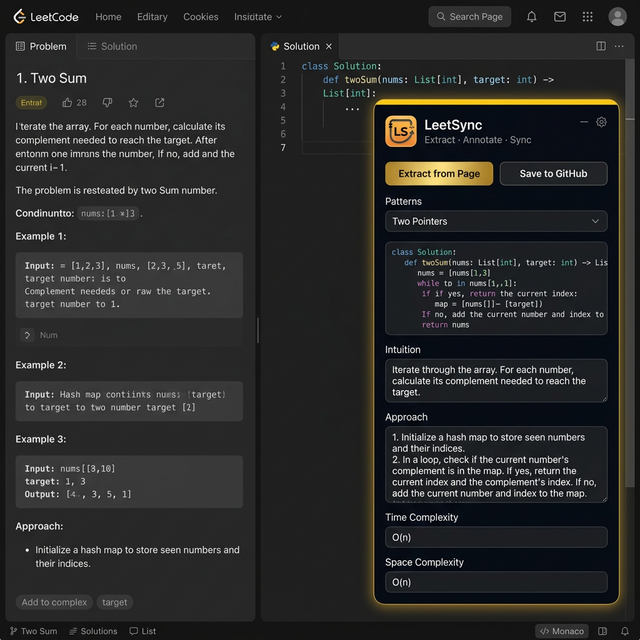
The LeetSync panel lives alongside the problem. Extract code, write notes, and save — without leaving the page.
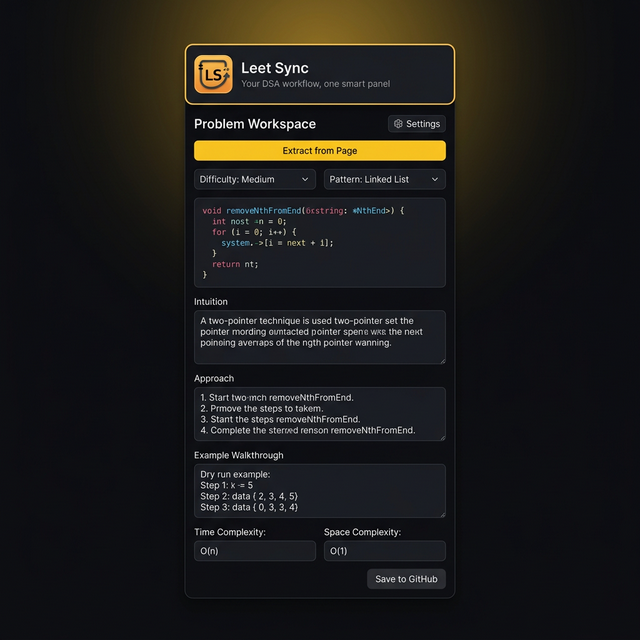
Full workspace: code preview, Intuition, Approach, Walkthrough, Time & Space Complexity. All in 390px.
HOW IT WORKS
Write and submit your LeetCode solution normally. LeetSync sits ready — in-page overlay or toolbar popup.
Click Extract from Page. The code, title, difficulty, and language are pulled automatically. Add your notes.
Click Save. A polished Markdown file is committed to your repository, organized by DSA pattern.
REAL OUTPUT
Actual output from saahilpal/leetcode
slow->next = slow->next->next. Return dummy->next as the new head.class Solution {
public:
ListNode* removeNthFromEnd(ListNode* head, int n) {
ListNode* dummy = new ListNode(0, head);
ListNode* fast = dummy;
ListNode* slow = dummy;
while (n--) {
fast = fast->next;
}
while (fast->next) {
slow = slow->next;
fast = fast->next;
}
slow->next = slow->next->next;
return dummy->next;
}
};YOUR REPO STRUCTURE
saahilpal/leetcode
├── Arrays & Hashing/
│   ├── 0001. Two Sum.md
│   ├── 0049. Group Anagrams.md
│   ├── 0128. Longest Consecutive Sequence.md
│   └── README.md
├── Two Pointers/
│   ├── 0015. 3Sum.md
│   ├── 0167. Two Sum II.md
│   └── README.md
├── Sliding Window/
│   ├── 0003. Longest Substring Without Repeating.md
│   └── README.md
├── Stack/
│   ├── 0020. Valid Parentheses.md
│   └── README.md
├── Binary Search/
│   └── README.md
├── Linked List/
│   ├── 0019. Remove Nth Node From End Of List.md
│   ├── 0021. Merge Two Sorted Lists.md
│   ├── 0206. Reverse Linked List.md
│   └── README.md
├── Trees/
│   ├── 0104. Maximum Depth Of Binary Tree.md
│   └── README.md
├── Heap / Priority Queue/
│   └── README.md
├── Backtracking/
│   └── README.md
├── Tries/
│   └── README.md
├── Graphs/
│   ├── 0133. Clone Graph.md
│   └── README.md
├── Advanced Graphs/
│   └── README.md
├── 1-D Dynamic Programming/
│   ├── 0070. Climbing Stairs.md
│   └── README.md
├── 2-D Dynamic Programming/
│   └── README.md
├── Greedy/
│   ├── 0055. Jump Game.md
│   └── README.md
├── Intervals/
│   └── README.md
├── Math & Geometry/
│   └── README.md
├── Bit Manipulation/
│   └── README.md
└── README.md
FIRST-TIME SETUP
GitHub's API can't create empty folders. Run one of these scripts once inside your repo to scaffold every pattern folder with a README, then push to GitHub.
#!/bin/bash
# Run this inside your LeetCode solutions repo

patterns=(
  "Arrays & Hashing"
  "Two Pointers"
  "Sliding Window"
  "Stack"
  "Binary Search"
  "Linked List"
  "Trees"
  "Heap / Priority Queue"
  "Backtracking"
  "Tries"
  "Graphs"
  "Advanced Graphs"
  "1-D Dynamic Programming"
  "2-D Dynamic Programming"
  "Greedy"
  "Intervals"
  "Math & Geometry"
  "Bit Manipulation"
)

for pattern in "${patterns[@]}"; do
  mkdir -p "$pattern"
  cat > "$pattern/README.md" << EOF
# $pattern

Solutions for the **$pattern** pattern.

| # | Problem | Difficulty | Solution |
|---|---------|------------|----------|
|   |         |            |          |
EOF
  echo "✅ Created: $pattern/"
done

echo ""
echo "🎉 All 18 pattern folders created!"
echo "Now run: git add . && git commit -m 'init: scaffold pattern folders' && git push"Arrays & Hashing/0001. Two Sum.md, but the folder must exist first. This script creates all 18 pattern folders with a README so they're tracked by Git.
INSTALLATION
Click the button below to get the extension .zip file.
Unzip to any folder on your machine.
Go to chrome://extensions in Chrome, Brave, or Edge.
Toggle Developer Mode ON in the top-right corner.
Click "Load unpacked" and select the extracted dist folder.
Open the popup → enter your GitHub PAT (Classic), username, and repo name.
No sign-up · No tracking · Works on Chrome, Brave, Edge, Open Unpacked
Chrome Web Store requires developer registration fees. To keep this project 100% free and open source, the extension is distributed directly. This ensures the project remains independent, transparent, and exactly as intended.
THE PROJECT
Every developer who grinds LeetCode faces the same issue: solutions are written, submitted — and then lost. Copying code to GitHub manually is tedious. Writing proper notes? Even more so. Most people just stop doing it.
LeetSync automates the entire workflow. One click extracts your code. Structured fields guide your thinking. And a single "Save" button pushes a beautifully formatted Markdown file — with Intuition, Approach, Walkthrough, Complexity, and Code — directly into your GitHub.
Anyone who wants their LeetCode practice to become a visible GitHub portfolio. Students preparing for interviews. Developers building discipline. Anyone who believes practice should be documented, not disposable.
TypeScript · Vite · Chrome Manifest V3 · Shadow DOM overlay · GitHub Contents API · Zero runtime dependencies. Under 40 KB total bundle. Built for performance.